Folio number FAQ
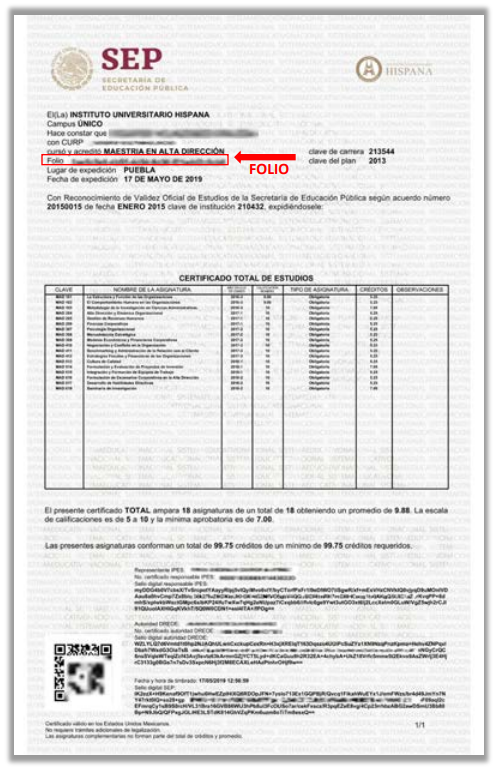
Where to find your Folio number in your Certificado de Educación Superior (IPES)
Please refer to the sample IPES below to find your Folio number.
How do I verify using ZippedScript?
- On the ZippedScript main page, click the "Verify Now" button:
- For desktop users: Located at the top right of the main page
- For mobile users: Located at the top of the main page
- Enter your email address to receive the verification result, and click "Continue".
- In the "Select the country where your institution is located" dropdown, choose "Mexico".
- In the "Select Your Institution" field, type the name of your school and select the most appropriate option.
- In the "Select the type of degree you would like to verify" dropdown, choose the degree you wish to verify.
- For "Graduation status", select either "Enrolled" or "Graduate" as appropriate, and click "Continue".
- Input your Folio number or ID number, then proceed.
What is the Secretaría de Educación Pública
The Mexican Ministry of Public Education's Electronic Service, known as "Sistema de Información y Gestión Educativa" (SIGED), is an online platform that provides various educational services and information to citizens. These services include:
- Access to academic records
- Consultation of official degrees and diplomas
- Information on educational institutions
- Access to educational statistics and data
SIGED aims to modernize and streamline administrative processes related to education, making information more accessible to students, educators, institutions, and the general public.
You can access the Mexican Ministry of Public Education's SIGED system at: Official SIGED page
Why use Folio number with ZippedScript?
The Folio number with ZippedScript enables secure verification and easy sharing of your Mexican university degrees with potential employers or institutions, providing temporary access without requiring full account access, thus enhancing privacy and security.